News
Tesla Track Mode V2 Release Notes: Third-Party Charging, Bluetooth update included

Tesla has started rolling out software 2020.8.1 that includes Track Mode V2 for Model 3, third-party charging stations, improvements to Model S and Model X regenerative braking, and a host of other features.
YouTuber Tesla Raj explored the latest software update using the Model 3 Performance of Wade Anderson (@TeslaSocialC) to demonstrate features for Track Mode and discuss what’s new. The 2020.8.1 firmware includes improvements to Navigation, Driving Visualization, Bluetooth, regenerative braking, voice command reliability, third-party charging station options, plus minor updates on language support.
Track Mode V2 for Model 3
The latest version of the Track Mode for the Model 3 started rolling out as a free over-the-air (OTA) update earlier this week and coinciding with the launch of the Model 3 Track Package for racing enthusiasts.
Track Mode V2 gives Model 3 owners the option of customizing settings for Handling Balance, Stability Assist, Regenerative Braking, among others.
“Track Mode has been improved to make it easier to monitor the status of your car, create custom track mode settings profiles and record your track day data,” the 2020.8.1 firmware release notes read.
Tesla Raj, upon getting the latest software update, tested the Track Mode V2 on the Model 3 and switched the car to rear-wheel drive with no stability assist.
“I have never… I don’t have much experience in a Performance Model 3 but I’ll tell you one thing. My heart, lungs, and liver, and all my body parts are all here in my chest,” said Tesla Raj.
Tesla Raj and Tesla Social also switched to full front-wheel drive and then to 50-50 to feel how the car would perform.
Track Mode allows owners to create 20 profiles that perfectly suits their preferences and driving scenarios. Users can also customize the settings for a specific track.
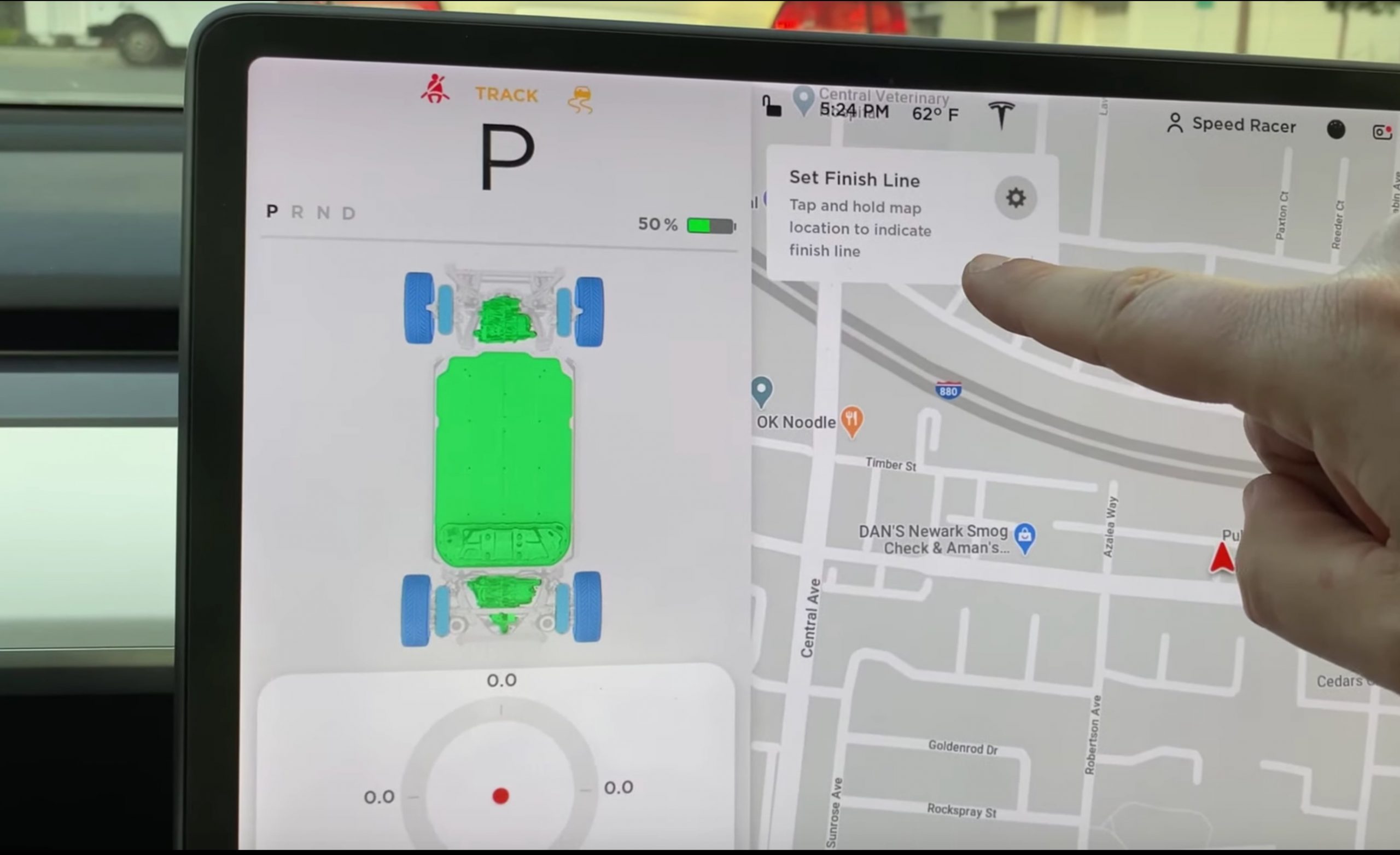
Track Mode V2 also allows you to monitor the status of the car’s motors, brakes, and tires. The latest firmware also allows one to see a real-time accelerometer via the G-meter. Likewise, the map now includes a Lap Timer.
Model 3 owners can also save a video and other data of their driving sessions while on Track Mode. One has to assign a folder named “TeslaTrackMode” in the plugged USB flash drive where all the files would be saved. Track Mode will also store telemetry data, car status, speed, acceleration, and use of accelerator on the flash drive.
Bluetooth, Driving Visualization, And More
Tesla also tweaked how Bluetooth audio transitions from one’s phone to the car with this latest update. Now, Bluetooth connects a paired phone only after sitting in the driver’s seat and once all of the vehicle’s doors are closed.
More users can now enjoy the improved driving visualizations showing stoplights, stop signs, and select road markings, which was only available before to Tesla owners in the United States.
According to the release notes, Tesla has also improved voice command reliability even in areas with poor connectivity.
Tesla owners in select sites in the San Francisco Bay Area can now find third-party charging stations via in-car navigation. Users in other locations in the US will also be able to enjoy this feature soon.
-

- Tesla firmware 2020.8.1 release notes (Credit: Tesla Raj)
-

- Tesla firmware 2020.8.1 release notes (Credit: Tesla Raj)
-

- Tesla firmware 2020.8.1 release notes (Credit: Tesla Raj)
-

- Tesla firmware 2020.8.1 release notes (Credit: Tesla Raj)
Regenerative Braking Improvements and New Navigation for Model S and Model X
Firmware 2020.8.1 also gives Model S and Model X owners increased regenerative braking that improves the overall driving experience and increases the amount of energy actively returned to the vehicle’s battery when slowing down.
The latest update also introduces a new navigation system with improved routes, more accurate arrival times, and a more responsive instrument cluster.
The full release notes for Firmware 2020.8.1 can be found below:
Introducing new Navigation (Beta)
Only Model S and X
Introducing a new navigation system for your vehicle that provides improved routes, more accurate arrival times, and a more responsive instrument cluster view to better display upcoming maneuvers.
For China: This release also includes new maps on the touchscreen. You can now view the maps in satellite view and see nearby points of interest.
Driving Visualization Improvements
This has been added for more regions, previously just the US.
The driving visualization can now display additional objects which include stop lights, stop signs and select road markings. The stop sign and stop light visualizations are not a substitute for an attentive driver and will not stop the car. To see these additional objects in your driving visualization, tap Controls > Autopilot > Self Driving Visualization Preview.
Track Mode Improvements
Only Model 3 (Performance)
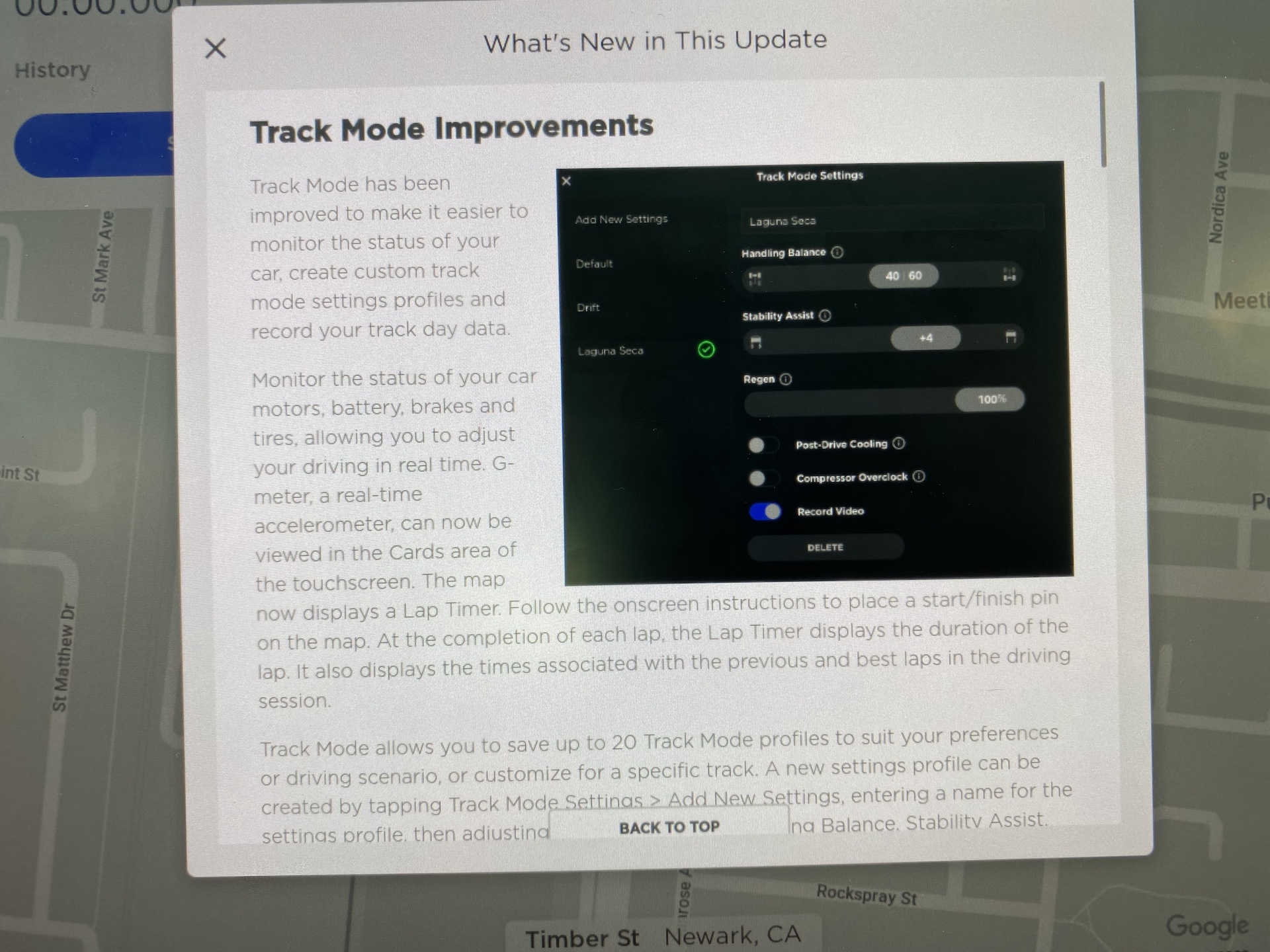
Track Mode has been improved to make it easier to monitor the status of your car, create custom track mode settings profiles and record your track day data.
Monitor the status of your car motors, battery, brakes and tires, allowing you to adjust your driving in real time. G-meter, a real-time accelerometer, can now be viewed in the Cards area of the touchscreen. The map now displays a Lap Timer. Follow the onscreen instructions to place a start/finish pin on the map. At the completion of each lap, the Lap Timer displays the duration of the lap. It also displays the times associated with the previous and best laps in the driving session.
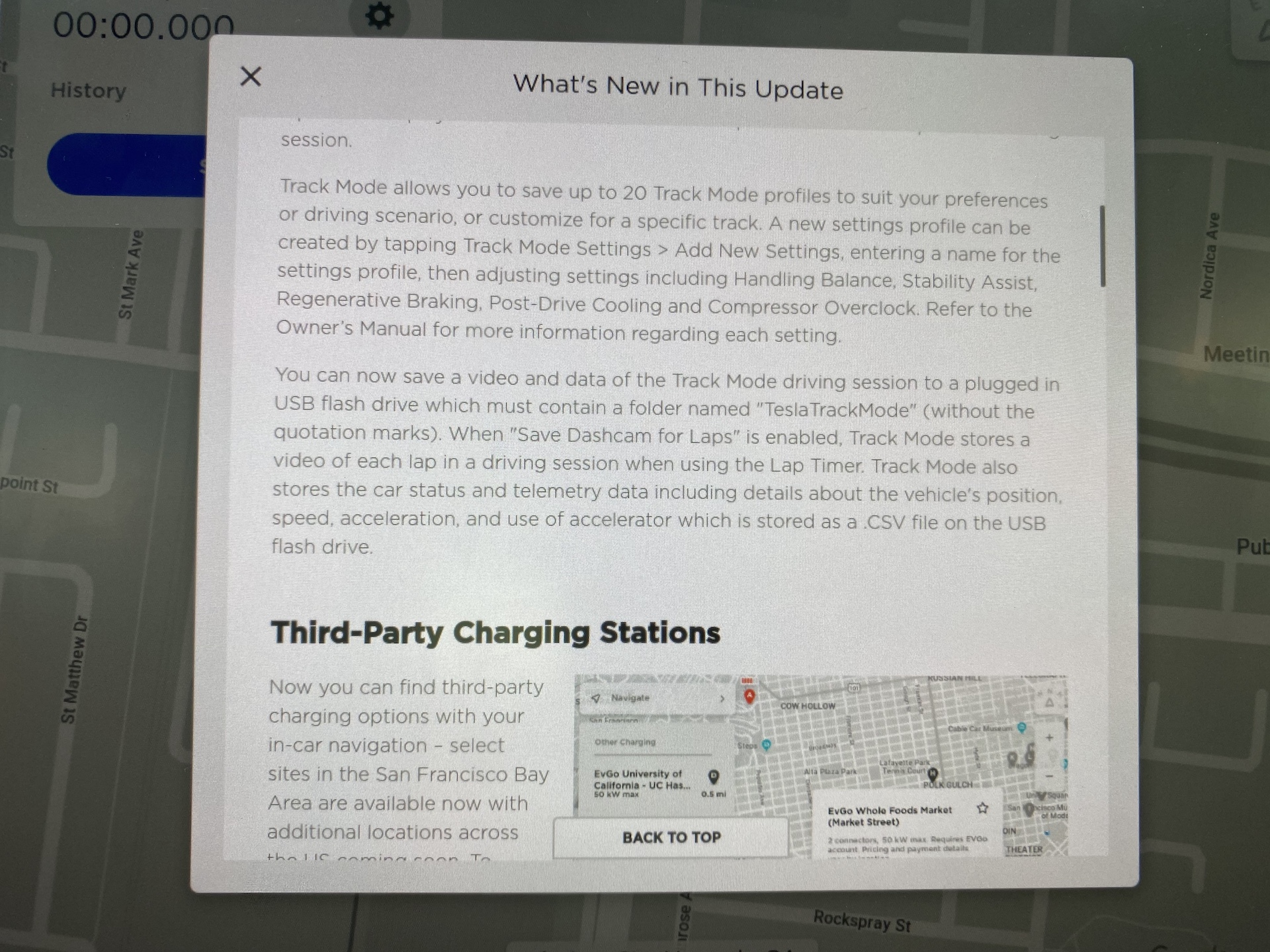
Track Mode allows you to save up to 20 Track Mode profiles to suit your preferences or driving scenario, or customize for a specific track. A new settings profile can be created by tapping Track Mode Settings > Add New Settings, entering a name for the settings profile, then adjusting settings including Handling Balance, Stability Assist, Regenerative Braking, Post-Drive Cooling and Compressor Overclock. Refer to the Owner’s Manual for more information regarding each setting.
You can now save a video and data of the Track Mode driving session to a plugged in USB flash drive which must contain a folder named “TeslaTrackMode” (without the quotation marks). When “Save Dashcam for Laps” is enabled, Track Mode stores a video of each lap in a driving session when using the Lap Timer. Track Mode also stores the car status and telemetry data including details about the vehicle’s position, speed, acceleration, and use of accelerator which is stored as a .CSV file on the USB flash drive.
Third-Party Charging Stations
Only vehicles in California.
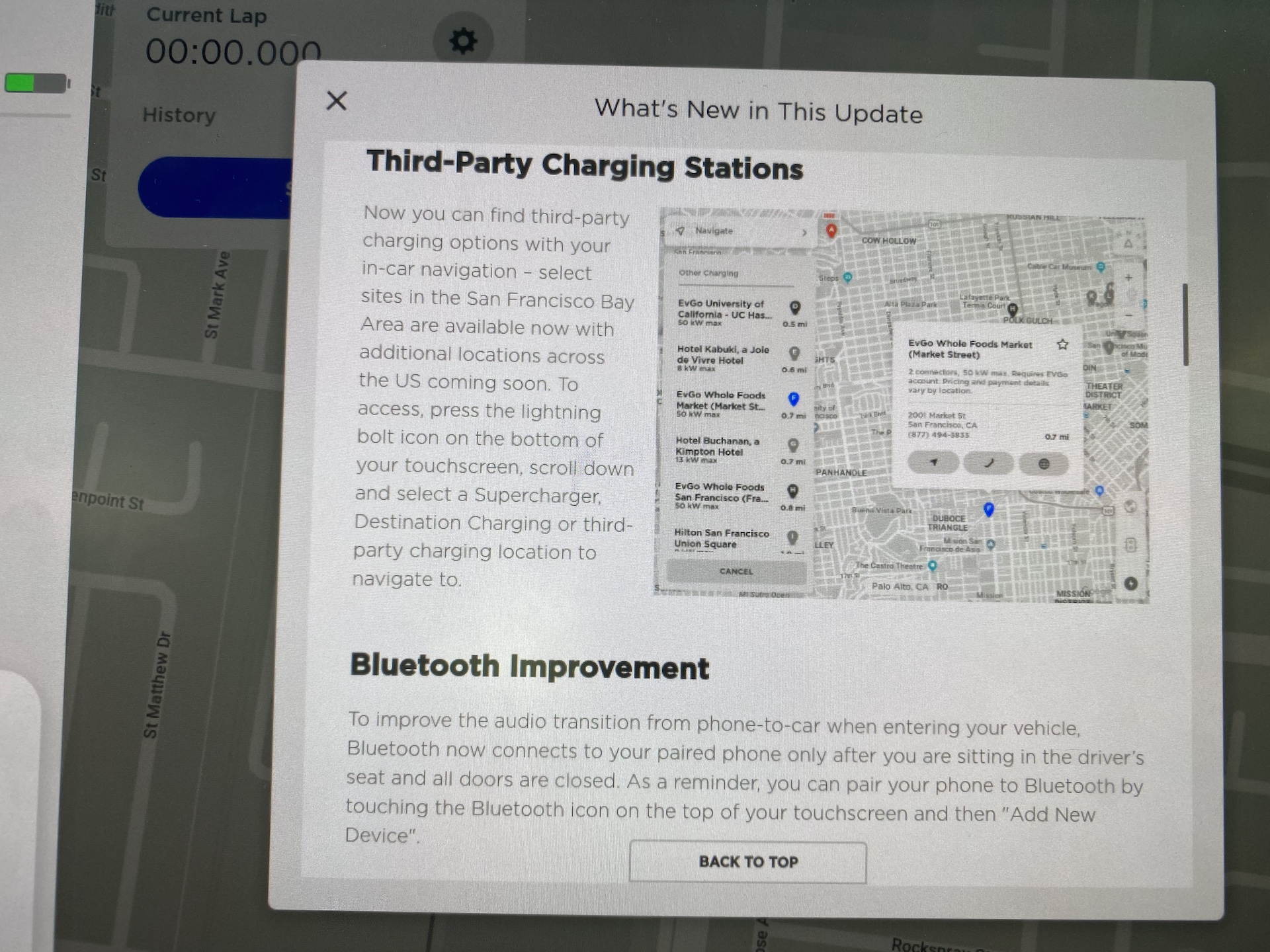
Now you can find third-party charging options with your in-car navigation – select sites in the San Francisco Bay Area are available now with additional locations across the US coming soon. To access, press the lightning bolt icon on the bottom of your touchscreen, scroll down and select a Supercharger, Destination Charging or third-party charging location to navigate to.
Bluetooth Improvement
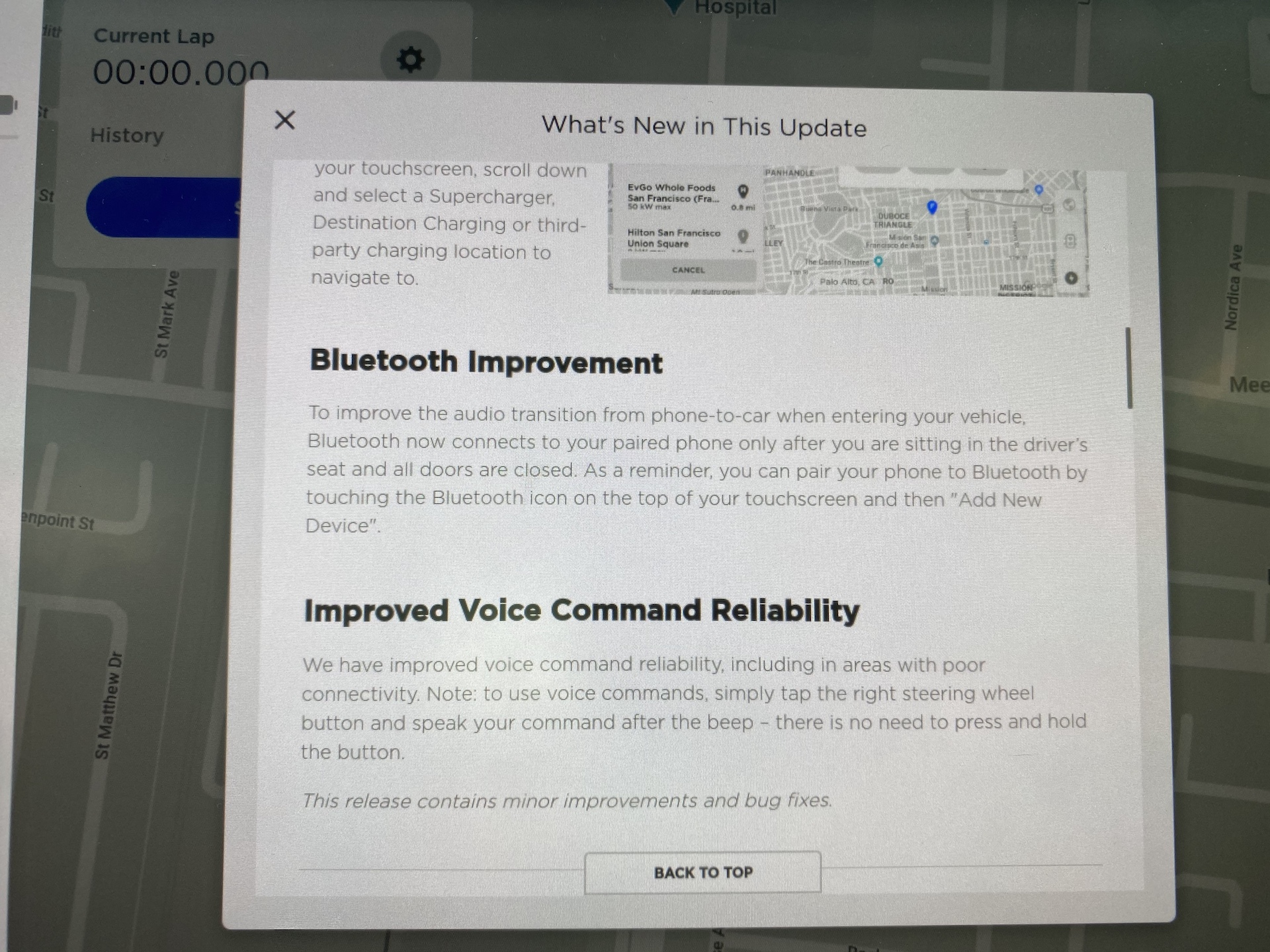
To improve the audio transition from phone-to-car when entering your vehicle, Bluetooth now connects to your paired phone only after you are sitting in the driver’s seat and all doors are closed. As a reminder, you can pair your phone to Bluetooth by touching the Bluetooth icon on the top of your touchscreen and then “Add New Device”.
Regenerative Braking
Only Model S and X
Regenerative braking force has been increased to improve the driving experience and increase how much energy is actively returned to the battery when slowing down.
Improved Voice Command Reliability
We have improved voice command reliability, including in areas with poor connectivity. Note: to use voice commands, simply tap the right steering wheel button and speak your command after the beep – there is no need to press and hold the button.
Additional Language Support
Your touchscreen is now available in additional languages. To change the language, simply go to Controls > Display > Language. Please note that your vehicle must be in PARK to enable this selection.
Additional Owner’s Manual Languages
The Owner’s Manual on your touchscreen is now available in Romanian, Hungarian, Slovenian, and Hebrew. As a reminder, you can change the language of the Owner’s Manual by tapping Controls > Service> Owner’s Manual and select your preferred language from the dropdown menu.
This release contains minor improvements and bug fixes.


News
SpaceX readies Starship Flight 14 for a historic journey into uncharted territory
SpaceX finished Starship’s Flight 14 rehearsal, clearing the way for its first orbital flight Monday.

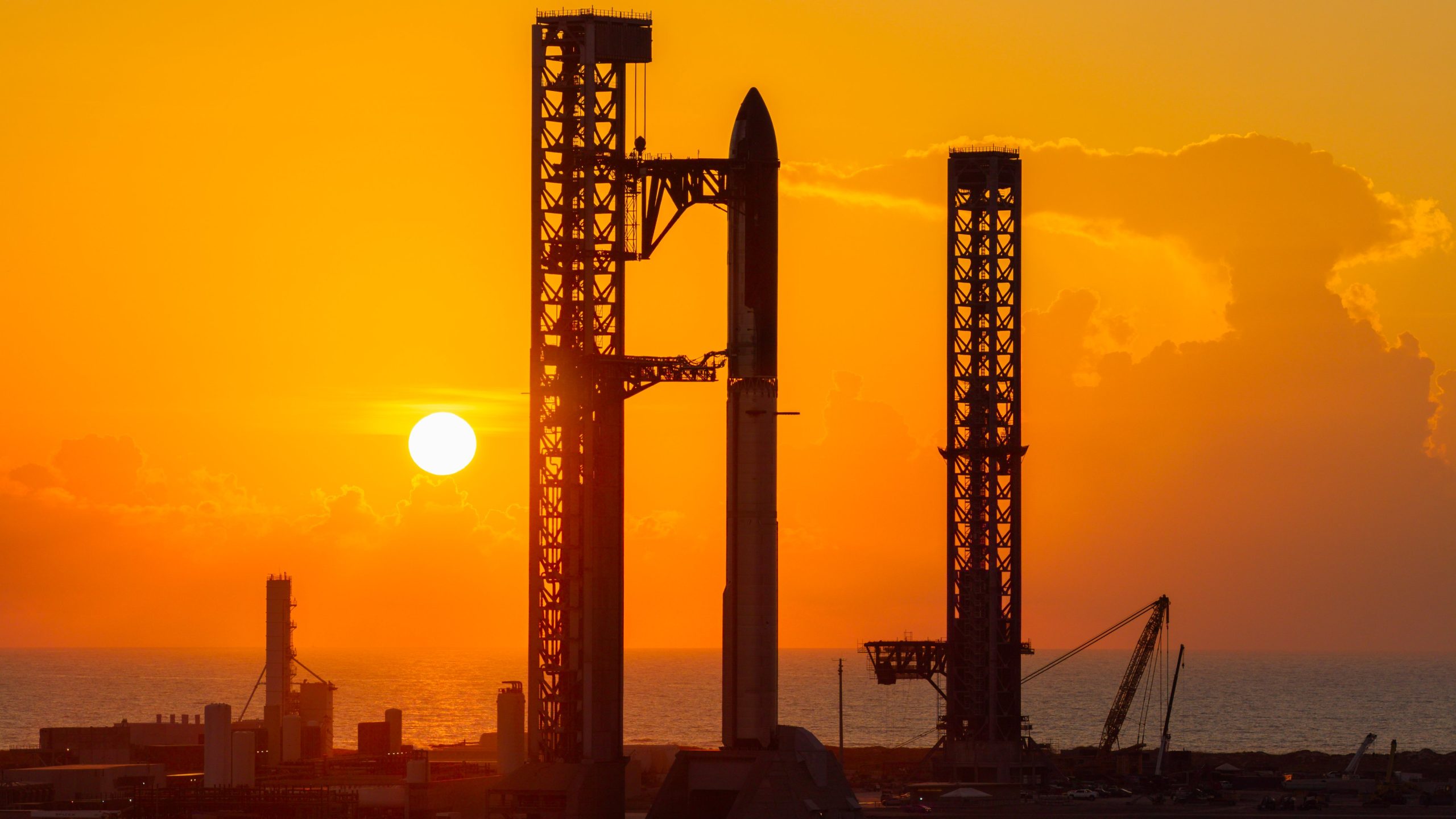
SpaceX has cleared one of the last hurdles before Starship’s first trip to orbit. The company posted on X Thursday afternoon that its launch rehearsal for Flight 14 was complete, keeping the mission on track for Monday, September 28. The launch window opens at 7:15 a.m. CT at Starbase, Texas, and runs for 75 minutes.
A wet dress rehearsal is essentially launch day without the launch. Crews fill Booster 21 and Ship 41 with thousands of tons of extremely cold propellant, run the countdown nearly to ignition, then drain everything back out. It lets engineers catch leaks or equipment problems before anything leaves the pad. SpaceX still needs a launch license from the FAA before the stack, which stands 407 feet tall, can fly.
Flight 14 matters because of where it is going. All 13 previous Starship flights followed a suborbital path, which works like throwing a ball extremely high and far: the vehicle reaches space, but it is always on a course that brings it back down within about an hour. This time, Ship 41 will perform a short engine firing called an orbital insertion burn roughly 25 minutes after liftoff, giving it enough speed to keep falling around Earth instead of back into it. SpaceX plans about six laps at an altitude near 275 kilometers (171 miles) over nearly 10 hours, as Teslarati detailed when the mission was first announced.
Launch rehearsal complete ahead of Starship Flight 14 pic.twitter.com/h5LBYyBqi4
— SpaceX (@SpaceX) September 24, 2026
Getting into orbit also means Starship has to prove it can get back out. The ship must relight a single Raptor engine in space to slow down for reentry. SpaceX says it will only attempt the orbital insertion burn after flight controllers confirm the hardware needed for that return burn has enough backup, and its flight plan includes health checks that could shorten the mission to two or five orbits.
Flight 14 is also the first to put working satellites into service. Flight 13 carried 20 Starlink V3 satellites in July, but they came back down with the ship because that mission never reached orbit. This time, 26 V3 satellites are meant to stay up and join the constellation within a few weeks. Together they add about 26 terabits per second of network capacity, which SpaceX says is roughly 10 times what a single Falcon 9 launch of older V2 Mini satellites adds. Three of them carry cameras that will photograph Starship’s heat shield in orbit to check for tile damage before reentry.
The hardware has changed too. Ship 41 flies with extra fasteners on tiles in the most vulnerable areas, fixes for gaps where superheated plasma slipped behind tiles, and curved tiles designed to reduce heating between them. Two tiles recovered from Ship 40 will fly again, the first reuse of any part of a Starship heat shield. Booster 21 carries better engine filtering and new relight software after ice clogged three center engines on the previous booster, leaving only eight of 13 engines to restart for its landing burn.
Ship 41 is targeting a splashdown in the Pacific Ocean west of Chile, a new recovery zone after several Indian Ocean landings, while Booster 21 aims for the Gulf. Neither will be caught by the tower on this flight. Elon Musk said in August that a ship catch was likely “in a few months.”
Elon Musk
Google just picked SpaceX for its first step into orbital AI
Google will launch its first Project Suncatcher AI satellite on SpaceX’s Transporter-18 rideshare next week.
Google is about to put its own AI chips into orbit for the first time, and it is paying SpaceX to get them there.
The company said Thursday that the first in-orbit test of Project Suncatcher, its research effort to find out whether space can host large-scale AI computing, will fly next week on SpaceX’s Transporter-18 rideshare mission.
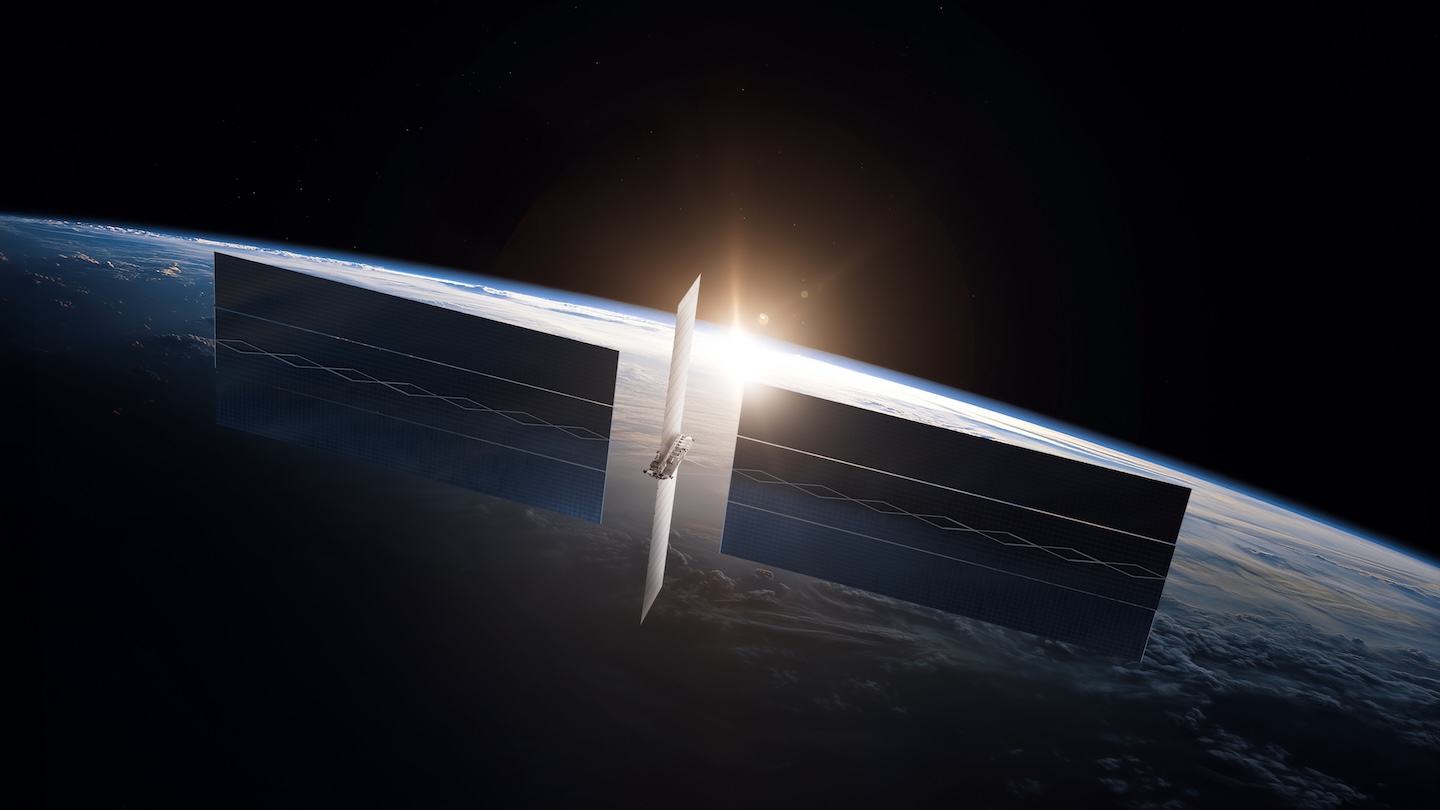
The satellite, called MVP, is about the size of a refrigerator and carries four of Google’s Tensor Processing Units, the same chips Google runs in its ground data centers. Google originally planned to launch two custom satellites in 2027, but chose to move faster by integrating its chips into a satellite.
MVP’s solar panels supply about one kilowatt of power, and Google will run Gemini models on the TPUs only in bursts of roughly 15 minutes before the chips shut down so the radiators can shed heat. In a blog post, Google said its Trillium TPUs survived vibration testing that mimicked sustained launch loads of up to 10g, with individual components seeing 50 to 100g, and handled a radiation dose greater than a five year mission would deliver.
SpaceX and Google mull massive partnership on Musk’s orbital data dream: report
Next week’s flight, slated for October 1, follows a relationship that became public in May, when Teslarati reported that Google was in talks with SpaceX for a launch deal tied to orbital data centers. Google also holds a stake of roughly 6% in SpaceX.
The two companies are chasing the same idea from very different starting points. SpaceX’s own orbital compute program is built around the AI1 satellite, a roughly 70 meter structure derived from Starlink V3 hardware that is designed for 150 kW of peak compute, about 150 times the power MVP will draw. Elon Musk has brushed off concerns about crowding orbit with those satellites, and SpaceX is building its Gigasat factory in Bastrop, Texas, to produce them, targeting an annualized rate of about 1 GW of space compute by the end of 2027.
Musk also posted on X on Thursday that “the amount of compute in space will obviously round up to 100% of all compute.”
Google has been more cautious in public. Its research estimates that launch prices need to fall below about $200 per kilogram before an orbital data center can compete with a ground facility on energy cost, a threshold the company believes could be reached around the mid 2030s. The Suncatcher team has said it expects the effort to remain a project rather than a product for years, which leaves the first real test of its hardware riding on a rocket from the company with the most aggressive timeline in the field.

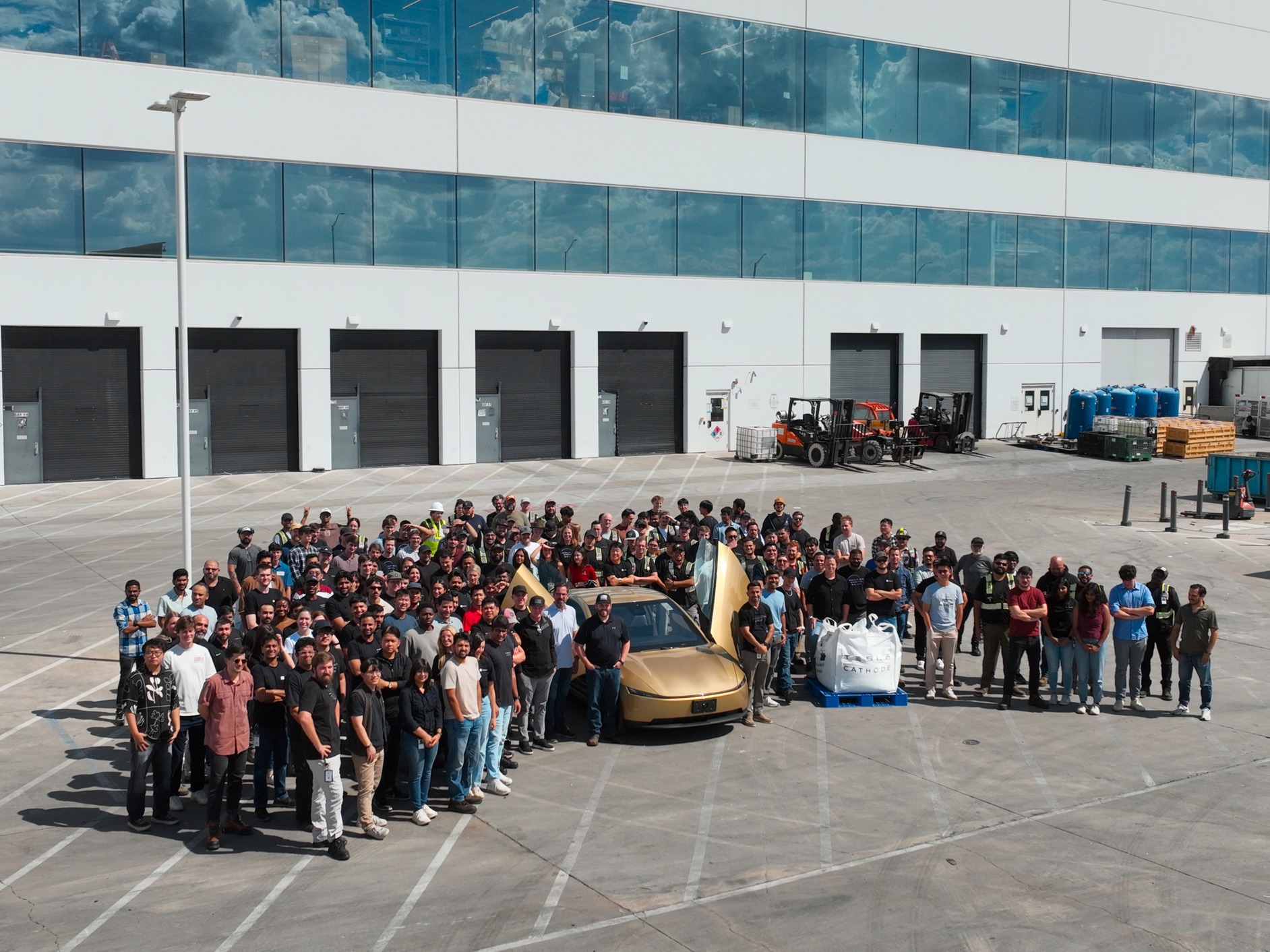
Tesla has taken another concrete step toward owning its battery supply chain, and it’s doing so with what is perhaps the most important vehicle in its short-but-storied history.
On September 23, Tesla announced that it has officially built the first Cybercab with cathode material produced in-house at the company’s first cathode plant in the U.S., and the first in the U.S. overall.
First Cybercab made using our in-house cathode material – from the first cathode plant in the Americas pic.twitter.com/X95aVXsT9H
— Robotaxi (@robotaxi) September 23, 2026
Active cathode material is the most expensive piece of a lithium-ion battery cell, and it often accounts for more than a third of cell cost. For years, the industry sourced a majority of it from Asia, but Tesla’s decision to make it in the United States bodes well for the Cybercab project. This is the latest chapter in Tesla’s vertical integration strategy, which began in public at Battery Day in 2020.
At the Battery Day Event, Elon Musk said the company would build a North American cathode plant and overhaul the process to cut costs and waste, while also making some of the most powerful and long-lasting cells in the industry.
The Austin facility took years to appear. Tesla filed permits for “Project Cathode” in 2022 on land near Giga Texas. By mid-2022, the building frame was up and Tesla later invested hundreds of millions of dollars as part of a larger expansion of the Giga Texas plant. The company stated it was operating the first large-scale cathode production facility in North America to supplement 4680 cell production.
One month later, that material reached a finished Cybercab.
Made with nickel cathode manufactured locally at Gigafactory Texas! https://t.co/DqMm5fZV3n
— Elon Musk (@elonmusk) September 24, 2026
The timing of this breakthrough is monumental for the Cybercab program. As Tesla officially launched the first Cybercab rides to the public earlier this month, production of the ride-hailing-geared vehicle is moving forward on the planned S-curve that CEO Elon Musk told everyone to expect.
Nevertheless, packs of Cybercab units have been spotted throughout the United States, in an effort to potentially activate the fleet as soon as the company gains regulatory approval in various geographic areas.
On top of that, Tesla owning the cathode step and pairing it with its own in-house lithium from the Gulf Coast refinery shortens the supply chain that once stretched thousands of miles and subjects every pack to fewer external price shocks and geopolitical risks.
Tesla is not yet independent of all of its foreign suppliers, as some precursor metals come from mines and chemical plants. But the first in-house cathode Cybercab shows the company is closing the most expensive and most concentrated gap in its battery production efforts. For a vehicle like Cybercab to operate at a high utilization within the Robotaxi network, that control over cost is so crucial.
It is arguably as important as the software that drives it.

SpaceX readies Starship Flight 14 for a historic journey into uncharted territory

Google just picked SpaceX for its first step into orbital AI


